
Edge Guide
-
Posts
230 -
Joined
-
Last visited
-
Days Won
6
Content Type
Profiles
Forums
Gallery
Everything posted by Edge Guide
-
Hi, All. The site went down sometime yesterday as we were migrated to a new server without prior notice. Sorry for the issue. Robert
-

Last ford edge in western canada
Edge Guide replied to brucecorporal's topic in Buying, Leasing & Ordering
That's awesome that you got the last one and saddening at the same time.- 1 reply
-
- 1
-

-
test
-
In regard to the links for the two above posts not working, the files don't exist on the server....not sure what happened to them.
-
Why is this site servers so unreliable ?
Edge Guide replied to 1004ron's topic in Forum Help & Site Suggestions
It was actually a long time coming, but we moved to a new server and new software. It's a lot faster and more stable than ever before. Rob -
Super News Ticker Disabled Starting today, 03 March 2020, the Ford Super News Ticker is disabled.
-
Latest forum update trashed the profile photo
Edge Guide replied to 1004ron's topic in Forum Help & Site Suggestions
It's so very often that the software maker issues an update and breaks things. Not pleasant. -
Remove orange banner from top!
Edge Guide replied to omar302's topic in Forum Help & Site Suggestions
In the previous software version, you could hide/dismiss. This is their "improved" version ? -
A new section for EcoBoost Tuning
-
A new section for 3.5L / 3.7L Tuning
- 1 reply
-
- 1
-
-
2019 Edge Final Orders Due: 05 July 19 2020 Edge Order Bank Opens: 15 July 19 2020 Edge Scheduling Begins: 05 August 19 2020 Edge JOB1 Start of Production: 30 September 19
-
Here you go: https://www.fordedgeforum.com/forum/25-classifieds/
-
New forum for the 2019 Ford Edge and Lincoln Nautilus -
-
Ford Edge ST Nation ! There's now a separate site for the Edge ST Nation, which is specifically designed for Edge ST enthusiasts and owners. Click here to check out the site now.
-
Got to drive a ST Edge and a 2019 Sport Explorer Yesterday
Edge Guide replied to vmaxbaby's topic in Edge ST
Ford Explorer ST Facebook Page: https://www.facebook.com/groups/FordExplorerST -
The Explorer ST is gonna rock!?
-
Adding Photos / Media to a Post
Edge Guide replied to Edge Guide's topic in Forum Help & Site Suggestions
It must be permission based - I pasted the same video and it worked perfect. Looking into this. -
Adding Photos / Media to a Post
Edge Guide replied to Edge Guide's topic in Forum Help & Site Suggestions
-
Adding Photos / Media to a Post
Edge Guide replied to Edge Guide's topic in Forum Help & Site Suggestions
-
Adding Photos / Media to a Post Starting with this new version, you can drag files to the file bar (at the end of the post window) OR you can click on the "Insert Other Media" drop down bar if you wish to insert media that's already been uploaded or choose to insert an image from an outside URL / Website.
-
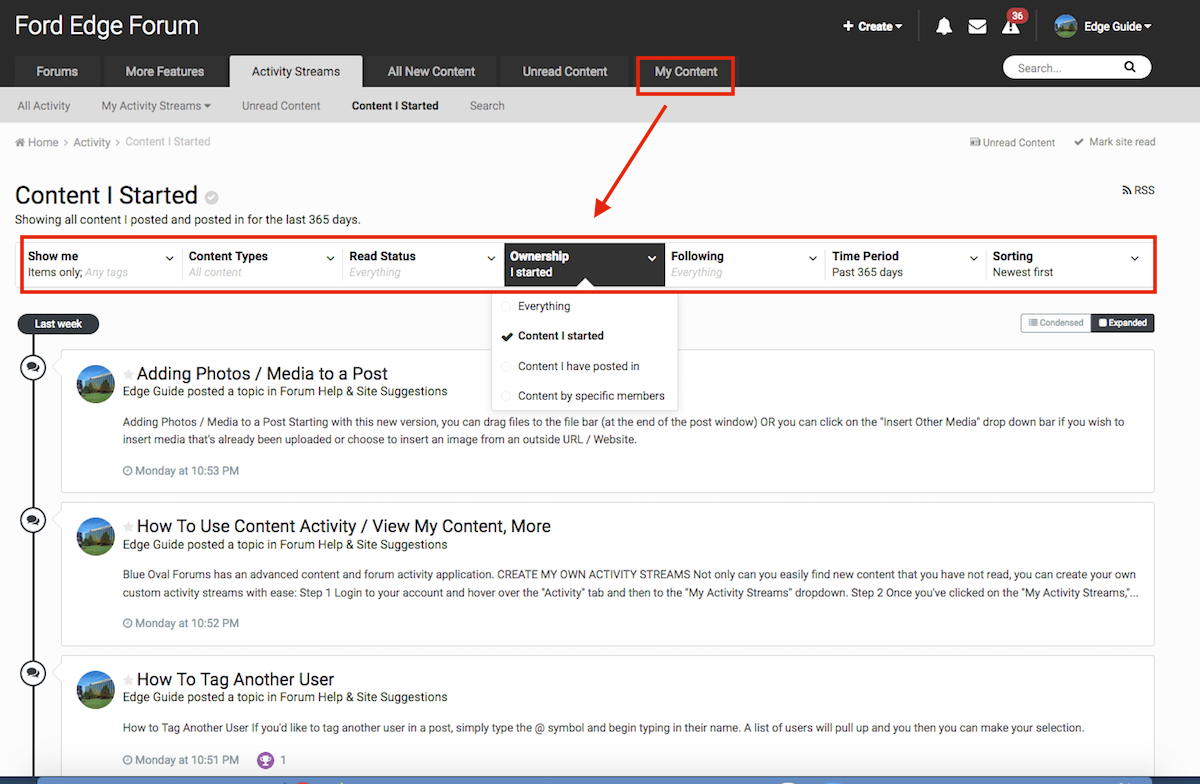
The Ford Edge Forum has an advanced content and forum activity application. MY CONTENT To view only the content that you've started, click on the "My Content Link." From there you can adjust it to view whatever you desire. There's also an expanded or condensed view. CREATE MY OWN ACTIVITY STREAMS Not only can you easily find new content that you have not read, you can create your own custom activity streams with ease: Step 1 Login to your account and hover over the "Activity" tab and then to the "My Activity Streams" dropdown. Step 2 Once you've clicked on the "My Activity Streams," choose "Create New Steam." Step 3 From here you can customize your own content discover search functions. These custom streams can be based on forums, images, tags or calendars. You can further tailor it to include when it was posted, ownership and more. If you wish to follow content in certain forums, you can click on "content types" and then the gear icon to select which forums you wish to receive updates to. The same applies for events, images, etc. Finally, don't forget to name your custom stream and click on the "Save Changes"

-
How to Tag Another User If you'd like to tag another user in a post, simply type the @ symbol and begin typing in their name. A list of users will pull up and you then you can make your selection.
-
Ford Edge Ecoboost Photos
Images added to a gallery album owned by Edge Guide in Member Photo Albums
<i>Official Ford Photos</i> -
-

From the album: Ford Edge Ecoboost Photos
test -
Thanks for gjb89 for suggesting this new forum
- 1 reply
-
- 1
-