WWWPerfA_ZN0W
-
Posts
11,144 -
Joined
-
Last visited
-
Days Won
272
Content Type
Profiles
Forums
Gallery
Everything posted by WWWPerfA_ZN0W
-
Timeline is skewed Gold --> Specialty Green --> Orange For your 2010, Specialty Green is appropriate. Or something like Peak or Zerex or Prestone Universal Extended Life, if flushing out the old. No idea if one OEM product is better than the other, or one can replace the other in your application. Definitely do not go backwards in the timeline. Frequency of coolant changes is likely more important anyway.
-
Welcome, Paul! Post pics of your Edge
-
Replacement of a pulley of the generator. Resource?
WWWPerfA_ZN0W replied to EDST777's topic in 3.5L
Have not seen just the pulley for the alternator, OEM or aftermarket. -
A low mileage Edge, but still, way too early to lose an alternator, unless it was overtaxed by a dying battery. What were the signs that led you to having this job done? Did you speak with Ford Customer Service directly, or did the dealer tell you Ford denied assistance?
-
Rear Differential fluid change procedure
WWWPerfA_ZN0W replied to evh's topic in All Wheel Drive (AWD)
Redline lightweight shockproof has lots of detergent in it, might want to give it a go for 1 round if you have a lot of "sludginess" still remaining. https://docs.google.com/spreadsheets/d/1gEMTa3YOBIYBTYiaEhQLfooPohN_l645z1DaWRuFzC0/edit#gid=409983061 -
Welcome & congrats! When do we get to see pics of this wee beastie!
-
What have you done to/with your Edge/MKX today?
WWWPerfA_ZN0W replied to WWWPerfA_ZN0W's topic in Accessories & Modifications
Every little bit helps! -
2007 edge trans shudder HELP!!
WWWPerfA_ZN0W replied to Tpanagrosso33's topic in All Wheel Drive (AWD)
Seems like you have already answered your question. Definitely need to pull the transmission and give it a once over, make sure there are no other issues with it. This is assuming the transmission fluid level & condition has been good thru this ordeal. -
Pinpoint Test AG: DTC U0197 Or DTC U0197:00 Normal Operation Several audio system modules receive network messages from the Accessory Protocol Interface Module (APIM) via the Medium Speed Controller Area Network (MS-CAN). As more than one module receives each of these messages, all modules receiving a particular message should exhibit a symptom if the message is missing. DTC U0197 (Lost Communication With Telephone Control Module) — set by the non-navigation Audio Front Control Module (ACM) and the Satellite Digital Audio Receiver System (SDARS) module when network messages are missing from the APIM for greater than 5 seconds with the ignition in RUN. DTC U0197:00 (Lost Communication With Telephone Control Module: No Sub Type Information) — set by the navigation ACM , the audio Digital Signal Processing (DSP) module, or the Global Positioning System Module (GPSM) when network messages are missing from the APIM for greater than 5 seconds with the ignition in RUN. This pinpoint test is intended to diagnose the following: Communication network concern Audio system concern APIM Poor sound quality/no sound while in satellite radio mode — all other functions operate correctly Satellite radio antenna Satellite radio antenna cable Wiring, terminals or connectors ACM (vehicles with navigation) SDARS module (vehicles without navigation) 2010 Edge_Poor Reception-Poor Sound Quality-No Sound — Satellite Radio Without Navigation.pdf
- 1 reply
-
- 1
-

-
Yes, both fans turn on with climate control on. If the pass side fan is on already, the driver side fan will come on as well. The driver side fan is secondary, and works WITH the pass side fan, not solo. The fans should turn off if you turn HVAC off and engine is below fan activation threshold. If you have dual climate control, or if the coolant level is low, you can see temperature mismatch happening. Fans not working correctly will compound the problem below 40 mph or so due to insufficient airflow thru the condenser. The MAF sensor does not feed any HVAC data, only engine data. The AAT sensor behind the bumper cover however DOES feed HVAC data. Highly doubt anything like this would cause a PCM problem unless there was a surge/backfeed of some kind. Like applying external power to the connectors outside of system specifications.
-
Aftermarket cameras are not able to be calibrated, so that feature will not work. Is this the camera? https://www.amazon.com/dp/B074V2S5LQ/ OEM camera https://www.ebay.com/itm/FORD-OEM-11-12-Edge-Rear-View-Backup-Back-Up-Camera-BT4Z19G490B/163539744916
-
When to change my back rotors? Already 160,000 km!
WWWPerfA_ZN0W replied to EDST777's topic in Brakes, Chassis & Suspension
General Specifications Item Specification Front Brake Disc Maximum brake pad taper wear (in any direction) 3.0 mm (0.118 in) Minimum brake disc thickness 26 mm (1.023 in) Minimum brake pad thickness 3.0 mm (0.118 in) Rear Brake Disc Maximum brake pad taper wear (in any direction) 3.0 mm (0.118 in) Minimum brake disc thickness 16 mm (0.629 in) Minimum brake pad thickness 3.0 mm (0.118 in) Pretty close to the rear rotors being worn out.- 1 reply
-
- 2
-
-
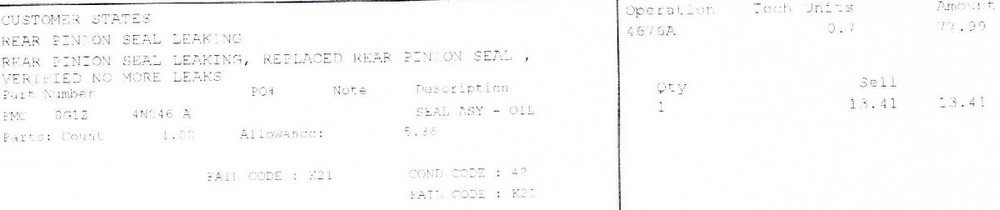
omar's link is correct. And that is the pinion seal for the RDU, not the PTU. The PTU is the front "differential". I had this seal leak on my 2007 also, I think I still have the invoice lying around, will verify.
-
Checked the connectors at the module and at the fans for dirt/grit/rust? If present, clean it up, add a dab of dielectric grease, reconnect, and test. The passenger side cooling fan is the primary fan, the driver side fan only comes to life when climate control is involved OR the engine cooling demand is high. So if the engine is below 210F, and climate control is completely off, no fans will come one. Over approx 40 mph, as a rule, no cooling fan is needed for the engine to stay in-temp, there is enough airflow. Could be the module is bad. Very rarely, the refrigerant hi pressure switch is bad and can cause trouble also. But odds are new fan assembly is required. You could get it operating properly with the current equipment, but it is unlikely to last.
-
2012 Edge Cooling Fans And A/C Stuff.
WWWPerfA_ZN0W replied to goslats's topic in Accessories & Modifications
Can't you just ziptie or ducttape it in place? Or are the wires/pins coming loose in the connector? If you have enough mileage on your Edge, you may be looking at a fan assembly replacement anyway. Closest thing I have found is this https://www.rockauto.com/en/catalog/ford,2011,edge,3.5l+v6,1446671,electrical-connector,radiator+fan+motor+connector,2556 So I am sure the exact connector you need, if not this, is out there. -
Welcome! X2 on photos!
-
What have you done to/with your Edge/MKX today?
WWWPerfA_ZN0W replied to WWWPerfA_ZN0W's topic in Accessories & Modifications
All that will definitely keep ya busy! -
Sorry about your 2007, congrats on the 2011. Welcome aboard!
-
Wow, good deal! By the way, free resources, including electronic owner's manuals and discounts off parts/service, are available to you at https://owner.ford.com/
-
New to us Edge with a couple Electric issues
WWWPerfA_ZN0W replied to KyleMerical's topic in Audio, Backup, Navigation & SYNC
FCIM information (the change seems to be 2012, not 2013?) This thread should help -
New to us Edge with a couple Electric issues
WWWPerfA_ZN0W replied to KyleMerical's topic in Audio, Backup, Navigation & SYNC
As an example, courtesy of fordpartsgiant.com, the ACM Radio/Audio System Select vehicle options to narrow down result ET4Z-18C869-JA Receiver Assy - Radio Audio Control Module (ACM) , Order From Audio/Multimedia Center Online Ordering System Using The Online 1878 Form Fit Note: Analog Audio Broadcast, Human Machine Interface 2, Human Machine Interface 3, Human Machine Interface 5, With Satellite Radio Reception Base Number: 18806 Callout Name: 18806 -- -- ET4Z-18C869-MA Receiver Assy - Radio Audio Control Module (ACM) , Order From Audio/Multimedia Center Online Ordering System Using The Online 1878 Form Fit Note: Analog Audio Broadcast, Human Machine Interface 3, Human Machine Interface 5, With Satellite Radio Reception Base Number: 18806 Callout Name: 18806 -- -- ET4Z-18C869-NA Receiver Assy - Radio Audio Control Module (ACM) , Order From Audio/Multimedia Center Online Ordering System Using The Online 1878 Form Fit Note: HD Radio Broadcast, Human Machine Interface 2, Human Machine Interface 3, Human Machine Interface 4, Human Machine Interface 5 Base Number: 18806 Callout Name: 18806 -
New to us Edge with a couple Electric issues
WWWPerfA_ZN0W replied to KyleMerical's topic in Audio, Backup, Navigation & SYNC
That is correct for the FCIM. The ACM any 2011-14 should do, as long as it is compatible with trim level/features list. You can look up the ACM with your VIN number to be sure. There is a thread detailing which FCIM to use as well. I find the search here to be very painful, but Google search does ease the pain substantially -
New to us Edge with a couple Electric issues
WWWPerfA_ZN0W replied to KyleMerical's topic in Audio, Backup, Navigation & SYNC
How the Audio/Information System is designed - what the components are ... Information and Entertainment System Functional Components All audio systems have the following functional components: Audio Front Control Module (ACM) Front Controls Interface Module (FCIM) Speakers (see Audio Line-Up for locations) Antenna, located at front of roof AM/FM antenna cable Steering wheel controls Steering Column Control Module (SCCM) The following functional components vary by vehicle option content: Accessory Protocol Interface Module (APIM), located behind and directly connected to the Front Display Interface Module (FDIM) FDIM Front Control/Display Interface Module (FCDIM) Global Positioning System Module (GPSM), located behind the instrument panel Instrument Panel Cluster (IPC) Audio Digital Signal Processing (DSP) module (THX® or Sony® sound), located behind the RH rear quarter panel Audio amplifier (Premium or THX®), located behind the RH rear quarter panel Satellite radio antenna cable Audio input jack Media hub Microphone, located in the headliner Audio Line-Up The vehicle is equipped with one of the following audio systems: Base — Edge AM/FM single CD ACM without satellite radio Non-touchscreen FCDIM Audio input jack One speaker in each front door, one 2-way speaker in each rear door Premium — Edge AM/FM single CD ACM with satellite radio Non-touchscreen FCDIM (without SYNC®) or FDIM (with SYNC®) SYNC® with media hub (optional) Audio input jack (without SYNC®) One 2-way speaker in each door, subwoofer in the RH rear quarter Sony® sound — Edge AM/FM single CD ACM with satellite radio and HD Radio® Touchscreen FDIM SYNC® with media hub Navigation (optional) One mid-woofer in each front door, one 2-way speaker in each rear door, an instrument panel speaker, 2 A-pillar speakers, 2 D-pillar speakers, subwoofer in the RH rear quarter Premium — MKX AM/FM single CD ACM with satellite radio Touchscreen FDIM SYNC® with media hub Navigation (optional) One woofer in each front door, 2 A-pillar speakers, one 2-way speaker in each rear door, an instrument panel speaker, subwoofer in the RH rear quarter THX® sound — MKX AM/FM single CD ACM with satellite radio and HD Radio® Touchscreen FDIM SYNC® with media hub Navigation (optional) One mid-woofer in each front door, one 2-way speaker in each rear door, a 3-way instrument panel speaker, 2 A-pillar speakers, 2 D-pillar speakers, subwoofer in the RH rear quarter All audio systems include the following features: Speed sensitive volume Accessory delay Steering wheel controls MP3 capability Satellite Radio The satellite radio system consists of the following: Satellite receiver (built in to the ACM ) Combination AM/FM/satellite radio antenna Satellite radio antenna cable SIRIUS® Data Services SIRIUS® data services are separate subscription services which are received through the satellite receiver. The data services include periodic updates for: Traffic Movies Weather Gas prices Sports score tracking Some services may be available separately while others are only available as packages. Navigation System The navigation system is resident in the APIM . The APIM uses the FDIM for the map display, and also networks the map data to the IPC for the RH display screen. The map data is stored on the SD card, which must be inserted in the media hub for correct navigation operation. The GPSM receives the GPS signal and networks it to the APIM . For vehicles with SYNC® but not navigation, turn-by-turn navigation is available as a subscription service. Operation is the same as with the on-screen navigation system except that no detailed map display information is sent to the FDIM . HD Radio® HD Radio® is a free to public digital radio broadcast. Radio stations transmit digital AM and FM audio and data (such as station call letters, artist, and title). HD Radio® channels duplicate analog channels; in addition, some HD Radio® channels subdivide (multicast) the digital signal into multiple channels that do not have analog equivalents. SYNC® The SYNC® system consists of the following: APIM Touchscreen FDIM SYNC®-specific steering wheel controls Microphone Media hub (includes 2 USB ports, an SD card slot, and RCA jacks) The SYNC® system is a hands-free communication and entertainment system that allows the following interactions: Send and receive phone calls via a Bluetooth-enabled phone Send and receive text messages via a Bluetooth-enabled phone Connect media devices (such as an iPod® or USB device) in order to play audio files Play media files via a Bluetooth-enabled audio device WiFi signal receiver for in-car internet access (requires customer-supplied USB modem) Producing vehicle health reports Initiating an emergency call (eCall) when the air bags deploy In addition to entertainment system control, the operator can also control the climate control system, the ambient lighting system (if equipped), and several other vehicle systems using either the touchscreen or voice controls. While SYNC® supports many features, not all features are available with every phone. For example, text messaging is supported by SYNC® but not available with most phones. For additional information on audio system operation, including the SYNC® system, refer to the Owner's Literature. -
New to us Edge with a couple Electric issues
WWWPerfA_ZN0W replied to KyleMerical's topic in Audio, Backup, Navigation & SYNC
Need to replace all 3 parts Head unit FCIM (?) with the updated part from 2013+ Backup camera to fix these very common issues. And welcome aboard! -
Not on the Edge/Nautilus AFAIK. On the F150, yes.